

Outlook: Create a New Folder – Here's How
To maintain an overview of your mailbox, it makes sense to create new folders in Outlook. You can organize your folders by business emails, personal emails, or by priority level. This can make many aspects of your daily work much easier. In this blog post, you will learn how to easily create a new folder in Outlook. The following instructions apply to all Outlook versions.
How to Create a New Folder in Outlook
Step 1: Start Outlook.
Step 2: Click on Inbox.
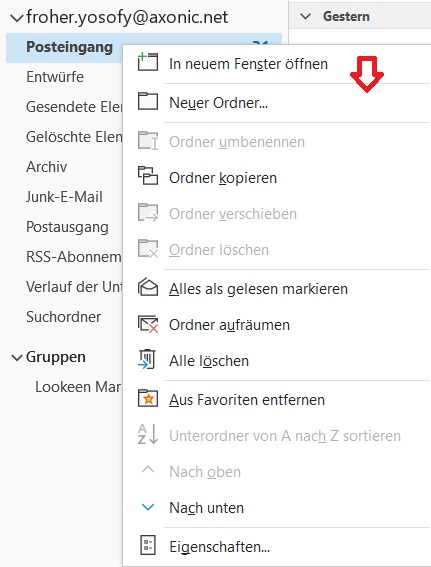
Step 3: Right-click and click on New Folder.
How to Create a Subfolder in Outlook
Step 1: Start Outlook.
Step 2: Click on Inbox and then click on the folder for which you want to create a subfolder.
Step 3: Right-click and click on New Folder.
I hope this article has helped you create a new folder in Outlook.
See you soon!


Comments