

Outlook: Translate Email – Here's How
These days, it is common to receive international emails on a daily basis. Even for language geniuses, it is sometimes more convenient to be able to translate an email directly. In newer versions of Outlook, translating an email is very easy. Find out how this works step-by-step in this blog post.
How to translate an email in Outlook
Step 1: Start Outlook.
Step 2: Open the email you want to translate.
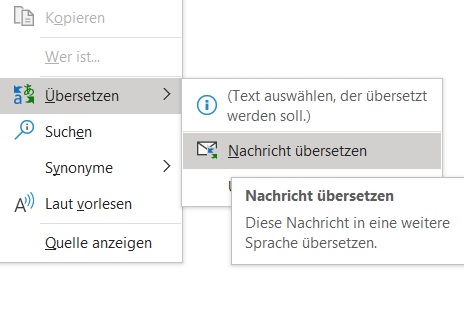
Step 3: Right-click and click on Translate and then on Translate Message. If you only want to translate a specific part of your email in Outlook, select it. Then also right-click as described above.
Outlook Translation Settings
You can set in Outlook which language you want your emails translated into. You can change this setting as often as you like. Find out how it works in this chapter.
Step 1: Start Outlook.
Step 2: Open the email you want to translate.
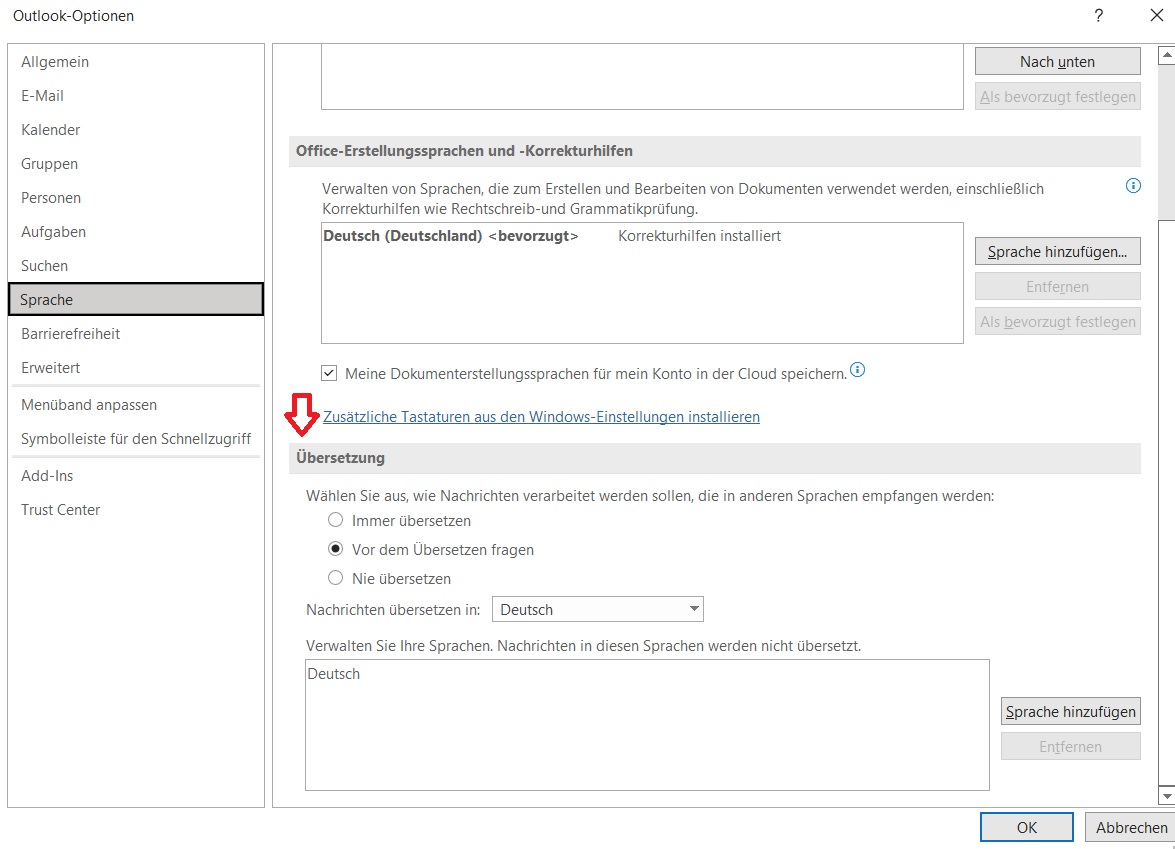
Step 3: Right-click. Click on Translate and then on Translation Settings. Now you can adjust your translation settings in Outlook.
I hope this article has helped you translate your emails in Outlook.
See you soon!
With Lookeen, you can find any email in Outlook in any language in seconds!


Comments