

Windows: Faster search using the search index – here's how
Indexing files accelerates and improves search operations within Windows Search. The Windows search index includes libraries, as well as offline data and emails. System and program files are not included by default, as they are searched for less frequently. You can decide which folders Windows should include in the search index. In any case, the search index provides a faster Windows search. Searching with Lookeen works even more efficiently and quickly than Windows Search thanks to real-time indexing. Here is what you need to know about the search index in Windows.
Add files to the Windows search index
The simplest way to add desired files to the Windows search index is to include the folder in a library, which automatically indexes its contents. However, the indexing settings can also be edited manually:
- Enter the search term Indexing Options in your Windows search and open it. You can also access the Indexing Options via the Control Panel.
- Here, you can activate or deactivate various checkboxes under the Change… button to edit the List of selected indexing locations. Some folders are listed incorrectly. These appear after clicking on Show all locations.
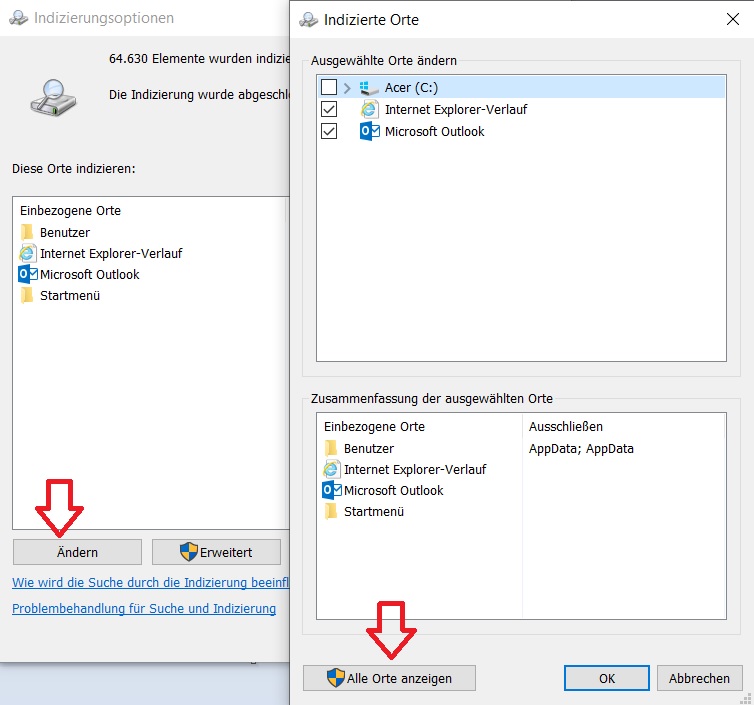
Amount of indexed data in the Windows search index
Theoretically, it is possible to add all files on a computer to the Windows search index – however, this is of little use, as the enormous number of data would significantly reduce search speed even for simple tasks. It is recommended to index only frequently searched folders for Windows Search. In principle, Windows also recommends letting indexing run in the background without interrupting it. Nevertheless, it is still possible to pause the index: Under Indexing Options, there is a corresponding Pause button. Clicking it pauses the process for 15 minutes each time.
Real-time indexing with Lookeen
A more efficient alternative to Windows Search is Lookeen: Indexing occurs completely once upon the first launch of Lookeen and includes not only file names and headings, but also the contents of the files. The system automatically detects when these are modified, deleted, or newly created – thanks to synchronization, the index remains up to date. Thanks to this real-time indexing, new data is always immediately available to the system, which greatly increases search speed.
I hope this article helped you achieve a faster Windows search.
See you soon!
All information about Lookeen's real-time indexing – Learn more here!



Comments