

How to Find Out the Size of Your Mailbox
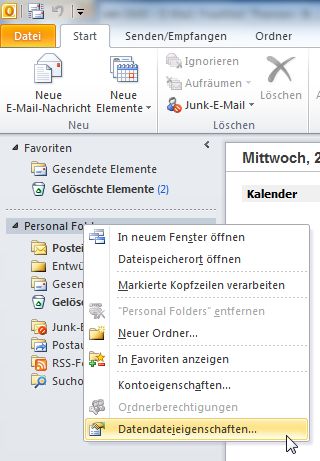
To be able to clean up and know when emails absolutely must be deleted quickly, it is very helpful to know the size of your own mailbox. How do you find out? Very easily.
- Open Outlook.
- Open the folder view where your Inbox, Sent Items, etc. are displayed.
- Right-click on Personal Folders.
- Click on Data File Properties.
The Outlook Today - [Personal Folders]: Properties window opens:
Click the Folder Size button here.
The Folder Size window opens. In this window, you can see the total size of all your folders and simultaneously check how large your subfolders are.

Comments