

Lookeen: The better Outlook search tool
With the Outlook search tool, you can easily search for individual emails. However, with larger data volumes and more extensive search queries, Outlook has problems. Here we show you which is the better Outlook search tool.
According to a statistic, approximately 115 billion business emails are sent worldwide per day. The number has increased year after year and is expected to rise to nearly 207 billion daily emails by 2017. The leading email program used for this is Microsoft Outlook. For office workers in a company, this presents a major challenge. In addition to the time spent sending and replying to emails, the growing flood of emails also makes it difficult to search for and find individual emails in the mailbox. Here, the Outlook search tool provides relief by sparing you the tedious scrolling through your infinitely long email list. You can simply enter a search term into the search field, and Outlook will find exactly what you are looking for.
Is the Outlook search tool sufficient?
With the Outlook search tool, everyone should be able to find what they are looking for. However, especially in large companies, Outlook often seems to reach its limits here. After all, a larger company also involves larger numbers of emails, contacts, appointments, or documents. As soon as the Outlook search query starts causing problems and can no longer find the desired email or contact, it is time to look for alternatives. There are plenty on the market – Lookeen is one of them that you should take a closer look at.
Lookeen, the best alternative Outlook search
The existing Outlook search tool is best suited for those who rarely need to search and have a manageable number of emails. However, if you need to use the search frequently and want to search Outlook not only for emails but also for attachments, email contents, contacts, tasks, and other items, then you need a more comprehensive search tool – such as Lookeen.
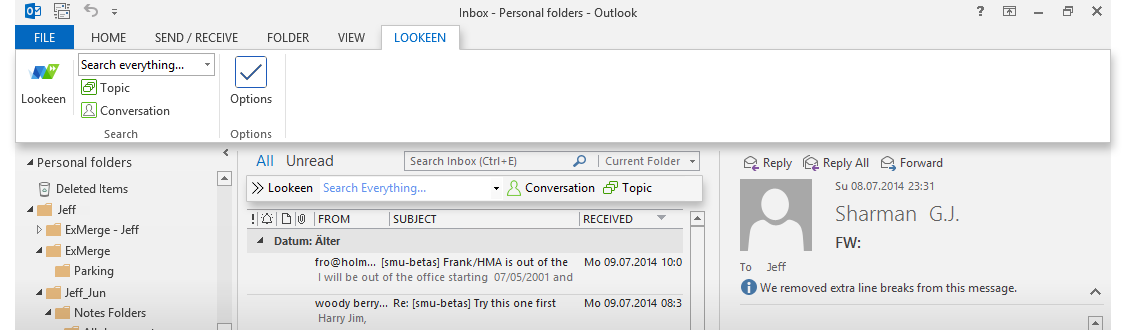
Lookeen is extremely easy to use and integrates completely into Outlook as an Add-In in the form of a Ribbon and Toolbar. It automatically recognizes all searchable data and starts indexing immediately after installation. With Lookeen, you have the option to apply different filter functions to make your search even more precise. The alternative Outlook search tool Lookeen works very quickly and even allows you to edit the desired document directly in Lookeen’s preview and save the changes. There is no need to open the document separately. If problems do arise, you can easily contact the free Lookeen support with your inquiry.
Lookeen works significantly faster than the Outlook search tool and can equally be used for desktop search on your computer. This increases your work productivity many times over and saves valuable time. To convince yourself of Lookeen’s benefits, you can test it free of charge for 14 days. You will notice – Lookeen is the better Outlook search tool.


Comments