

Outlook: Search for and find moved folders – here's how
You accidentally moved a folder in Outlook and can’t find it anymore?
Find a Specific Folder in Outlook
Quickly find missing folders with Lookeen – Learn more about it here!
This way, you don’t have to search through each folder individually to find your lost folder:
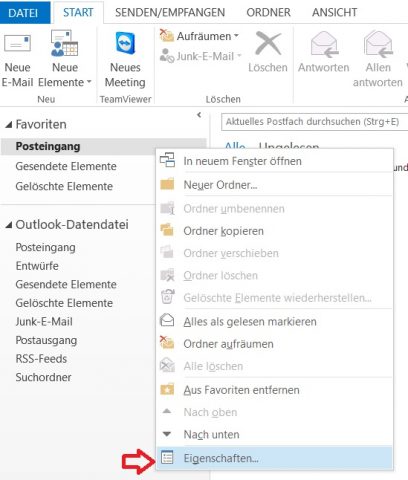
- Right-click next to your Inbox and then click Properties.
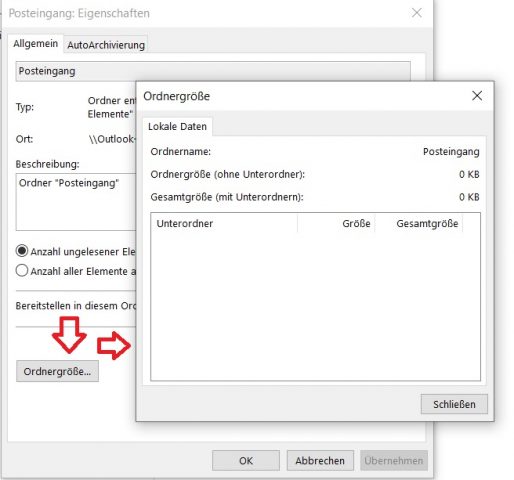
- In the new window, click the Folder Size field. Outlook will now list all folders and subfolders of your mailbox by name. Once you find the folder you’re looking for in the list, just look at the folder path to see where the missing folder ended up.
Advanced Search in Outlook
Do you remember any emails that might be in the folder you’re looking for? Then you can also use the advanced search in Outlook. Here’s how to do it:
-
Select the mailbox where you want to search.
-
Use the keyboard shortcut Ctrl+Y on your keyboard.
-
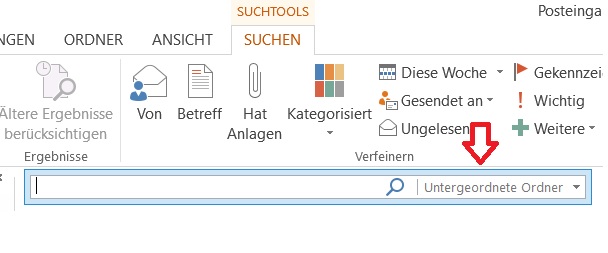
In the field next to the magnifying glass, click Subfolders.
-
Select All Folders and click OK.
-
Enter your keyword and click the magnifying glass to start the search.
-
Once you find the email containing your keyword, select it with a double-click.
-
Using the shortcut Ctrl+Y, you should now see the exact path of your folder displayed.
Find Outlook Folders with Windows Search
An alternative to this is Windows Search – here too, the prerequisite is that you have a term in mind that might be contained in an email in the folder you’re looking for:
-
Enter your keyword into the search bar of Windows Search.
-
Right-click on the found message. Then click the command Show Results.
-
A window with the search results will then open, where you can display details under View. The folder path is listed here, telling you where the searched folder is located.

Search Outlook with Lookeen
Instead of the conventional Windows Search, you can also use an alternative desktop and Outlook search tool like Lookeen. The principle remains the same, but Lookeen works faster and more reliably: Thanks to real-time indexing and advanced search parameters, Lookeen is the perfect search solution when you need to find Outlook folders.
With these steps, you should be able to easily find your moved or lost folder.
See you soon!



Comments