

The new Lookeen – the next generation of desktop search
The development took two years, and now it is here: Lookeen Desktop Search, the competitor to the Windows Desktop Search. What drove the development was the desire to make desktop search as easy as possible for Windows users.
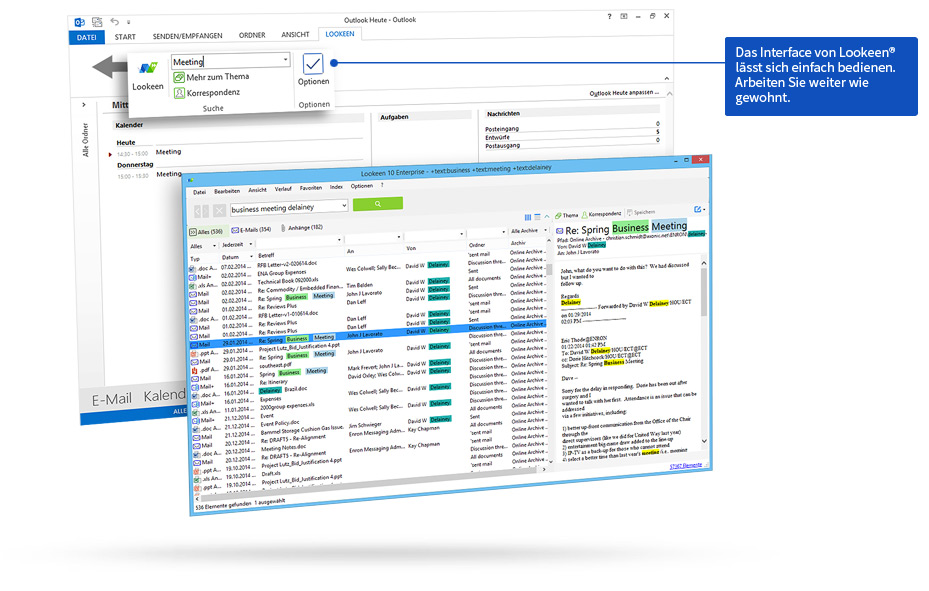
The most important features of Lookeen at a glance – Learn more about them here!
Professional Search for the Desktop
For the first time, Lookeen is independent of Outlook. As a standalone desktop search tool, it is accessible from anywhere, e.g., via shortcuts on the desktop or in the taskbar. However, the easiest way is simply pressing Ctrl twice. This allows the desktop search to be invoked in any situation. Outlook users who were worried about constantly switching back and forth can rest assured. Lookeen remains integrated as an add-in in Outlook.
Faster than ever
Of course, not everything has stayed the same. Thanks to numerous improvements, Lookeen is even faster than before. This is particularly evident in the new search-as-you-type feature. It displays initial potential search results as the user types.
More precise and targeted
Advanced filter options and new wildcards make Lookeen more accurate than any other search tool.
- The * wildcard can now be used at any position within a word. Example: “Dach*” yields results like “Dachgarten”, “*dach” shows words like “Hausdach” or “Schiebedach”.
- Search terms are already color-highlighted in the results list.
- The results themselves can be freely formatted and further narrowed down using more than 25 filter options.
- The latest version of the search engine, Lucene 3.0, is integrated.
The new preview feature
When briefly looking up information in documents, Windows users previously always had to launch separate programs – even if they immediately closed them afterward. With the new preview, this is no longer necessary. PDFs and documents from Word or other word processors can simply be viewed within it, as if they were opened in their native applications. The special feature: local documents can still be edited and saved simultaneously. This eliminates the need to constantly open Word or Excel.
Changes have been made, qualities remain
Users do not need to worry about their data either. Lookeen creates its index entirely on the local hard drive and leaves it there. Even as part of an enterprise-wide search solution, all data remains completely stored on internal servers and is never shared with developers or third parties. With its support for virtual desktop environments (VDI) such as VMware, Citrix, and Terminal Server, Lookeen offers the same user-friendly interface and fast search on every virtual desktop. For more information, please read our press release.



Comments