

How to Keep Emails Organized Using Conversation View
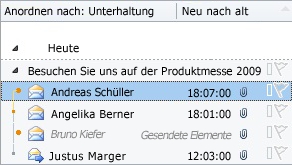
With Outlook 2010, another way was introduced to keep the inbox tidy: the Conversation View. You may have already noticed that emails in Outlook 2010 are not only sorted by date but are also automatically grouped into conversations.
All messages with the same subject are grouped into a conversation thread. A similar function existed in earlier Outlook versions; what is new now is that messages from the Sent Items folder or other subfolders that share the same subject are also taken into account.
To open a conversation, click the small arrow to the left of an email in the inbox. The conversation history will then expand, and all emails you have received or sent under that subject will be displayed. Here is how to set your emails to appear in Conversation View:
Search for Outlook emails by date or subject with ease!
- Click the Conversations button in the top main menu.
- Enable the two options Show as Conversations and Show messages from other folders.
As you can see – the Conversation View is very helpful for keeping an overview of your inbox. But that’s not all – the Conversation View can do even more.
Clean up conversations Outlook offers the ability to clean up conversations with just one click. This means that redundant emails are deleted. You know the drill – with every new reply to an email, all previous messages are appended below the new message. With the Clean Up Conversation feature, all older emails are deleted, leaving you with the latest email containing the entire conversation thread.
- Click Clean Up in the top main menu.
- Click Clean Up Conversation.
Ignore conversations Especially in a work environment, you often receive emails that concern a group of people. If you then receive every reply from the participants involved, it can become annoying. To do this, click Ignore in the top main menu. The entire conversation and all future replies will be moved to the Deleted Items folder. To avoid unpleasant surprises, you might want to check these folders occasionally, just in case an important reply did come through… ;-)

Comments