

Outlook Search Broken After Windows Update – The Solutions
The December 2021 Windows update with the identifier KB5008212 has disabled Outlook search for many users. According to Microsoft, an optimal solution to this problem is not yet in sight, but work is underway. You can find the details of the disruption published by Microsoft here. But don’t worry; I will present solutions so that your Outlook search continues to function despite the update.
Proposed Solution 1 for Outlook Search Issue After Windows Update
The Outlook search plugin Lookeen searches all your emails incl. archives in seconds, as it is based on real-time indexing. It is significantly faster than the Outlook search and also more precise. You can learn how to optimally use Lookeen as an Outlook search alternative here.
Lookeen makes Outlook search work flawlessly and in real time!
Proposed Solution 2 for Outlook Search Issue After Windows Update
This solution is temporary and somewhat tedious, as you must perform the following steps after every restart of your PC. With Lookeen (see Proposed Solution 1) as a search plugin for Outlook, however, you only need to install it once on your PC and it will work smoothly. If you do not wish to use an external search for Outlook, follow the instructions below:
Step 1: Open your Task Manager using the keyboard shortcut Ctrl + Shift + Esc.
Step 2: Click the More details button. You will now automatically be on the Processes tab.
Step 3: Scroll down until you find the entry for Microsoft Windows Search-Index. Then end this task.
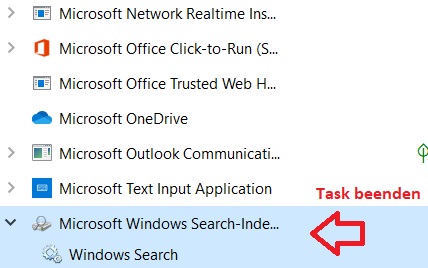
The Outlook search should now work again until the next restart of your computer. Repeat these steps after every startup of your PC to ensure the functionality of the Outlook search using Proposed Solution 2.
I hope this article has helped you get your Outlook search working again after the December Windows update.
See you soon!



Comments